
ACDT-19 Digital Timer
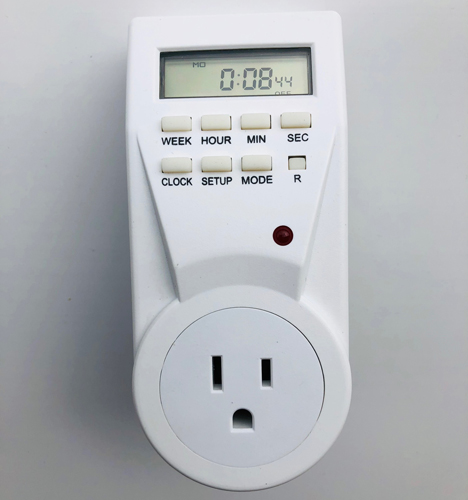
Commonly used with a Super Feeder automatic pet feeder to trigger the feeder and feed pets up to 20 times in a 24-hr period, this weekly digital timer will provide up to 20 “on-off” programs for all days of the week, certain week days or particular days of a week all year long. It has battery back-up power to maintain exact time and programs during power outages or when unplugged. It is grounded with a 3-prong outlet. A perfect companion for your Super Feeder if you need many daily small portions for a pet or for any other suitable application like lamps, Christmas lights, LED lighting, etc... A random mode is available to turn lamps on or off at random times when away from home. This timer uses 24-hr or AM-PM clock for programming. Minimum on-off time: 1 minute
For customers who are really wanting a “slow feeder,” using this timer in conjunction with the Super Feeder is actually very effective by feeding very tiny portions of kibbles every 3 or more minutes up to 20 times per day! This system is great for pets prone to vomiting if eating too much or even better to trim down pets by feeding more often with much smaller portions.
ACDT-19 (ETU-23A manufacturer's number) Digital Timer Programming (up to 20 daily cycles)
- First, insert timer in outlet to charge timer’s internal battery for at least 1 hour before use.
- Push the small recessed “reset” switch (R) then press and hold the “clock” button and press the “week” button to set day of week.
- Push the “hour” button repeatedly until you have the correct hour, push “min” button for minute and “sec” for seconds if you want to adjust seconds also.
- Release the “clock” button and time should be set.
To program same feed cycle(s) at the same daily time(s) all 7 days of the week all year long:
- Push the “SETUP” button once and you should see dash lines, a “1” (first feed cycle) and “ON” in the window along with “OFF” to the right.
- Push the “WEEK” button once and you should have all 7 cursors at the top of the window under all 7 days of the week if wanting to feed at that same time all days of the week. Select individual days or group of days if not wanting all 7 days.
- Push “HOUR” “MIN” button until you have set the desired “ON” time in the window you want your first feed cycle to occur. You will later be programming the “OFF” time the same way below.
- Push the “SETUP” button once more and you should see dash lines, a “1” (still first feed cycle) and “OFF” in the window along with “OFF” to the right.
- Repeat steps 2 and 3 to program “OFF” time 2 minutes later than the “ON” time you previously selected in step 3. Example: 5:00 “ON” and 5:02 “OFF” in 24-hr format. This will be your first morning feeding time. Do the same thing for all additional feed cycles.
- Repeat above sequence for additional feed cycles up to 20 times per day making sure that you have at least 2 minutes of “OFF” time between subsequent programmed feed times. Example: You may feed twice in as little time span as 5 minutes. We recommend feeding small portions several times per day. NOTE: To void a program, select programmed on and off times of program you want to delete, and push the "MODE" button to show dash lines, which indicate that program is deleted.
- When done, push the clock button and then cycle the “MODE” button until you have selected “AUTO” and “OFF” (NOT “ON” OR "ON" AND “AUTO!!”) in the display for automatic mode. Note: You may turn on your feeder manually by pushing the “MODE” button until you have only “ON” in the window, but make sure you return it to “AUTO” and “OFF” for automatic operation with no blue or green power light in the feeder. For additional information, review the timer’s instruction manual you received with the timer.
Other information you may find helpful:
- To change from AM to PM format, push the "MIN" and "SEC" buttons at the same time.
- To change to Daylight Savings Time push "HOUR" and "MIN" buttons at the same time.
- To change to "RANDOM" for random "on" and "off" cycle, push "WEEK" and "HOUR" button at same time. DO NOT use this mode with feeder unless it is your intent to feed at random times of day.
- To delete a program, select the program you want to delete in the display by pushing the "SETUP" button, then push the "MODE" button. To delete a feed cycle, be sure to delete both the on and off programmed times for each program number you want to delete. You must only have dash lines -- : -- and no numbers for unused on-off cycles! If you do, your timer may miss some cycles and operate incorrectly.
PLEASE NOTE THAT IF YOU ARE HAVING A PROBLEM WITH A TIMER SUPPLIED BY US, YOU DO NOT HAVE TO USE THAT TIMER PENDING RESOLUTION OF YOUR PROBLEM, YOU MAY USE ANY OTHER TIMER AVAILABLE LOCALLY TO OPERATE YOUR SUPER FEEDER®.
Download this page as a printable pdf: ACDT-19 Digital Timer by Super Feed Pdf